
If your Lovable project just stopped working after weeks of iteration, you are not alone. This is the single most common experience with AI coding tools, and there are concrete steps you can take right now to recover your project. Authentication failures, infinite error loops, security vulnerabilities, and deployment crashes account for the vast majority of Lovable breakdowns. Each has a specific diagnosis and a clear path forward.
This guide covers every documented failure mode, what causes it, how to fix it yourself, and when to escalate. We wrote it because the frustration is real: users report spending 20 or more credits chasing a single bug in circles, watching the AI introduce new errors while claiming it fixed the old ones. There is a way out.
Why Lovable Projects Break
Lovable is excellent at what it does best: generating a polished, working web application from a natural language prompt in minutes. The tool has earned its $6.6 billion valuation because the first 70-80% of app development genuinely works. UI scaffolding, basic CRUD operations, simple page routing, and database schema generation all happen fast and reliably.
The breakdowns happen in the remaining 20-30%. As one detailed 2026 review put it, “Lovable gets you at most 70% of the way there, but you'll spend a lot of time wrestling with that last 30%.” Authentication flows, payment processing, role-based access control, complex state management, and third-party API integrations all operate under constraints that AI code generation handles inconsistently. Approximately 40% of backend failures in AI-generated code trace back to authentication alone.
Research from Stack Overflow published in January 2026 found that AI-generated code produces 1.7 times more bugs than human-written code overall, with 75% more logic errors specifically. Security bugs appear at 1.5 to 2 times the rate of human code. These are not hypothetical risks. In May 2025, a security audit found that 170 out of 1,645 Lovable-built applications had a vulnerability (CVE-2025-48757) that exposed user data including names, email addresses, payment details, and API keys to unauthenticated attackers.
This is not a criticism of Lovable alone. Bolt, v0, Replit, and other AI coding tools hit the same complexity ceiling. The difference is in what happens next. Understanding where your project broke tells you exactly what to do about it.
Failure Mode 1: Supabase Authentication Stops Working
Authentication is the number one reason Lovable projects break. If your app's login suddenly fails, redirects to a blank page, hangs indefinitely after sign-in, or throws “Invalid API key” errors, you are dealing with the most common and most documented Lovable failure mode.
What Goes Wrong
Lovable uses Supabase as its default (and only) backend. The AI generates Supabase auth configuration during initial scaffolding, but several specific patterns break it:
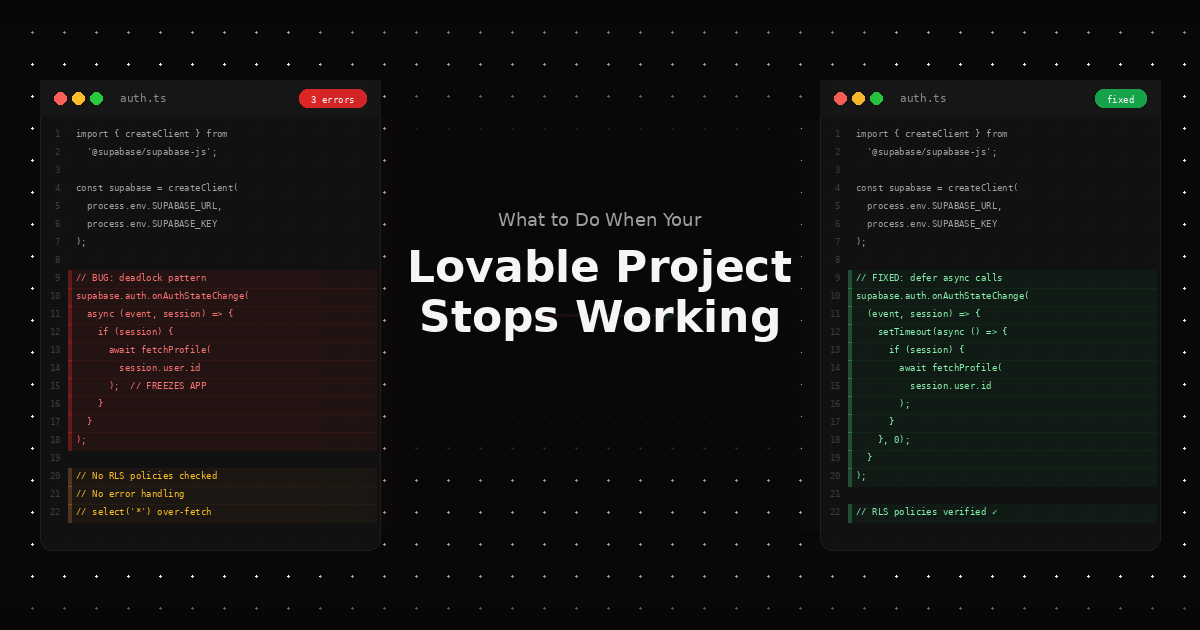
The deadlock bug. This is the most widely reported Lovable + Supabase issue. Lovable generates an async callback inside onAuthStateChange that calls other Supabase methods with await. According to Supabase's own documentation, this creates a deadlock: the callback runs synchronously during auth state processing, and awaiting another Supabase call inside it freezes the entire application. Your app hangs after login or on page refresh with an active session. The problematic code pattern looks like this:
// BAD: Lovable generates this pattern, which causes a deadlock
supabase.auth.onAuthStateChange(async (event, session) => {
  if (session) {
    await fetchProfile(session.user.id); // This freezes the app
  }
});
The fix is to defer the async operation:
// GOOD: Defer async calls with setTimeout
supabase.auth.onAuthStateChange((event, session) => {
  setTimeout(async () => {
    if (session) {
      await fetchProfile(session.user.id);
    }
  }, 0);
});
Row Level Security (RLS) policy conflicts. Lovable generates RLS policies incrementally. When you add new features, the AI creates new policies that contradict earlier ones. A table that was publicly readable becomes locked down, or a policy intended for authenticated users accidentally blocks the auth flow itself. In severe cases, this produces an “Infinite recursion detected in policy for relation” error in Supabase logs.
Google OAuth redirect misconfiguration. When testing on Lovable's preview URL, the “Sign In with Google” button redirects to localhost instead of the preview domain. This happens because Lovable sets the Supabase Site URL to localhost during development and does not always update it when the preview URL changes.
Email validation rejection. Users report Supabase rejecting valid email addresses with an “email_address_invalid” error (HTTP 400) during user creation. This traces to the default Supabase email provider having restrictions on external email domains. Configuring a custom SMTP provider resolves it.
Storage quota sign-in failures. If your Supabase project exceeds its storage quota, authentication stops working entirely with the error: “Service for this project is restricted due to the following violations: exceed_storage_size_quota.” Users can neither sign in nor sign up until storage is reduced or the plan is upgraded.
What to Do Right Now
- Check for the deadlock pattern first. Export your code or use Lovable's code viewer. Search for
onAuthStateChangeand look forasynccallbacks thatawaitSupabase calls. If you find this pattern, wrap the async operations insetTimeoutas shown above. This single fix resolves the most common Lovable authentication hang. - Check the Supabase dashboard directly. Log in at app.supabase.com and open your project. Go to Authentication > Users and verify that users exist and sessions are active. Check for any error messages in the Supabase logs (Database > Logs). This tells you whether the problem is in Supabase or in your Lovable frontend code.
- Inspect RLS policies. Navigate to the Table Editor, select the table causing issues, and review the RLS policies. Look for conflicting rules. A common problem is a
SELECTpolicy that requiresauth.uid() = user_idon a table the app reads during the login process, before anyauth.uid()exists. - Verify redirect URLs. In Supabase, go to Authentication > URL Configuration. Confirm that your Site URL and Redirect URLs match exactly where your app is hosted. For Google OAuth, also verify the redirect URI in the Google Cloud Console matches the Supabase callback URL:
https://[your-project].supabase.co/auth/v1/callback. - Check your storage quota. In Supabase, go to Settings > Billing. If you see storage warnings, delete unused files from Storage or upgrade your plan. Authentication will not work while the project is in a restricted state.
- Test with a fresh user. Create a new test user through the Supabase dashboard (Authentication > Users > Add User). If the new user can log in but existing users cannot, the issue is corrupted session data or a migration that changed the users table structure.
Failure Mode 2: Infinite Error Loops and Credit Burn
The error loop is the most financially painful Lovable failure mode. You click the “Fix” button. Lovable's AI attempts a fix. The fix introduces a new bug. You click “Fix” again. The AI reverts part of the first fix and creates a third bug. After 10-15 cycles, the codebase is significantly worse than when you started, and you have burned through credits with nothing to show for it.
Users describe this as “spending credits to fix something Lovable just said it fixed.” Others call it a “slot machine where you're not sure what an action will cost.” The pattern is consistent: minor changes introduce cascading modifications in unexpected files, making it difficult to trace where errors come from.
What Goes Wrong
Error loops occur because AI code generation operates without a persistent understanding of the full application architecture. Each fix is generated based on the current code state and the error message, without understanding why the code was structured the way it was. The AI treats symptoms rather than root causes.
Stack Overflow's January 2026 research confirms the pattern: AI-generated code produces 75% more logic errors than human-written code, and these logic errors are “the easiest to overlook in a code review” while also being the type most likely to cause production incidents. When an AI tries to fix its own logic errors, it compounds them.
Common triggers include:
- Cascading file modifications. The AI changes a shared component to fix a bug on one page, which breaks every other page using that component. Each subsequent fix modifies the component differently, creating an oscillating pattern.
- Circular dependency errors. The AI moves a function to resolve an import error, which breaks another import, which triggers another move. Each change is locally logical but globally destructive.
- TypeScript type mismatches. The AI generates a type fix that satisfies one interface but violates another. This is especially common with Supabase-generated types that span multiple tables.
- CSS and layout conflicts. The AI patches a layout issue on one page by changing a shared CSS class, which breaks the same component's appearance on other routes.
What to Do Right Now
- Stop clicking “Fix” immediately. If you have gone through more than 3 fix cycles without resolution, the AI is not converging on a solution. Each additional iteration makes the problem harder to unwind and costs you credits.
- Search the error message in r/Lovable. If you see multiple Reddit posts with the same issue, stop there. Other users have already confirmed that the AI cannot resolve it, and you will only waste credits chasing it.
- Use version history to rollback. Lovable tracks changes. Roll back to the last version that worked. You will lose recent changes, but a working starting point is worth more than a broken current state.
- Export to GitHub. Click the GitHub button in Lovable's interface to push your code to a repository. Once the code is in GitHub, you can use tools like Cursor or VS Code with Copilot to make targeted fixes with full codebase context. These tools see the entire codebase at once, which prevents the cascading-modification problem.
- Read the actual error. Lovable's UI sometimes summarizes errors in a way that obscures the root cause. Open your browser's Developer Tools (F12), go to the Console tab, and read the full error stack trace. The line numbers and file names in the raw error are more useful than the AI's interpretation.
- Use specific prompts, not “fix this.” If you do try one more cycle, describe the exact error message, the expected behavior, and the current behavior. Vague prompts like “it's broken” produce vague fixes. A prompt like “The login form submits but the onAuthStateChange callback never fires. The console shows ‘TypeError: Cannot read property id of null’ at line 47 of AuthContext.tsx” gives the AI something specific to work with.
Failure Mode 3: Security Vulnerabilities in Generated Code
This failure mode is different from the others because your app may appear to work perfectly while being fundamentally insecure. In May 2025, security researcher Matt Palmer discovered that Lovable's generated code consistently produced misconfigured Row Level Security policies, leaving databases open to unauthenticated access.
What Goes Wrong
The vulnerability, tracked as CVE-2025-48757, affected 170 out of 1,645 tested Lovable-built applications. The public anon_key embedded in Lovable's client-side code allowed direct Supabase queries that bypassed authentication entirely. Attackers could dump entire database tables without logging in.
The exposed data across affected applications included:
- User credentials (emails, usernames, phone numbers)
- Financial information (payment status, subscription data, Stripe integration parameters)
- API keys and developer credentials (including Gemini and Google Maps tokens)
- Personal information (home addresses, personal debt amounts)
The vulnerability touched 303 endpoints across the 170 affected apps. Palmer reported the issue to Lovable on March 21, 2025. When the 45-day disclosure window closed without a meaningful fix, the CVE was published on May 29, 2025.
Lovable released a “security scan” feature in its 2.0 update (April 2025), but independent analysis found the scanner only checked whether RLS was enabled, not whether the policies actually worked. Misconfigured policies passed the scan, creating a false sense of security.
What to Do Right Now
- Check your RLS policies manually. Do not rely on Lovable's built-in security scanner. In the Supabase dashboard, go to the Table Editor, select each table, and review every RLS policy. Verify that each table with sensitive data has policies that require
auth.uid()for both read and write operations. - Test unauthenticated access yourself. Open your browser's Developer Tools, go to the Console, and try querying your Supabase database using only the
anon_key(visible in your frontend code) without any authentication token. If you get data back, your RLS policies are not protecting that table. - Audit for exposed API keys. Search your entire frontend codebase for any API keys that should be server-side only: Stripe secret keys (
sk_live_*,sk_test_*), third-party API secrets, and database admin credentials. These should never appear in client-side code. - Review the Supabase security advisories. Check the Supabase documentation on RLS best practices. The default policies Lovable generates are often too permissive. At minimum, every table should have RLS enabled, and tables containing user data should restrict access to
auth.uid() = user_id. - Consider a professional security audit. If your application handles payments, personal data, or health information, the cost of a security review ($500-2,000) is significantly less than the cost of a data breach. Lovable's 2026 review explicitly warns: “avoid it if you handle sensitive data, payments, or regulated workloads.”
Failure Mode 4: Payment and Stripe Integration Failures
Payment integration is the second most common functional failure point in Lovable projects. Stripe requires server-side secret keys, webhook endpoints, and specific error handling that AI code generation handles inconsistently. Lovable's Supabase-only backend constraint makes this especially challenging.
What Goes Wrong
- Client-side Stripe key exposure. Lovable sometimes places the Stripe secret key (
sk_live_*orsk_test_*) in frontend code. This is a critical security vulnerability. The publishable key (pk_live_*) belongs in the frontend; the secret key must only exist on the server. - Webhook endpoints are missing. Stripe communicates payment confirmations, subscription changes, and refunds through webhooks. Lovable generates the checkout flow but frequently omits the webhook handler. Payments appear to succeed from the user's perspective, but the app never records the transaction.
- Test mode and live mode confusion. The AI generates code using Stripe test keys. When you switch to live keys, the product IDs, price IDs, and webhook secrets are different. The app breaks silently because Stripe returns API responses referencing products that do not exist in your live account.
- Supabase Edge Functions timeout. Lovable places Stripe server-side logic in Supabase Edge Functions. Long-running operations can exceed the default timeout, causing partial payment states where Stripe charges the customer but your app does not record the payment.
What to Do Right Now
- Search your entire codebase for
sk_liveandsk_test. If either appears in any file that is not a server-side function or environment variable, you have a security issue. Rotate your Stripe keys immediately in the Stripe Dashboard under Developers > API Keys. - Verify webhook configuration. In the Stripe Dashboard, go to Developers > Webhooks. Check that an endpoint exists pointing to your app's webhook URL. If no webhook is configured, payments will process in Stripe but your app will not know about them.
- Check the Stripe event logs. Under Developers > Events in the Stripe Dashboard, look for failed webhook deliveries (marked with red indicators). The error messages tell you exactly what went wrong: 404 means the endpoint URL is wrong, 500 means your server-side code crashed, and 401 means the webhook secret is incorrect.
- Match your key environment. Verify that all Stripe keys (publishable key, secret key, webhook signing secret, and all product/price IDs) come from the same Stripe mode (test or live). A single mismatch across any of these values causes silent failures.
Failure Mode 5: Deployment and Environment Issues
Your Lovable project works perfectly in the built-in preview but breaks the moment you deploy it to Vercel, Netlify, or any external host. This is one of the most common frustrations because everything appears fine until the very last step.
What Goes Wrong
- Environment variables are not transferred. Lovable's preview environment injects Supabase credentials, API keys, and configuration values automatically. When you deploy elsewhere, none of these exist unless you manually add them to the hosting platform's environment settings.
- CORS errors appear. In the Lovable preview, frontend and backend share the same origin. On a real deployment, the frontend domain differs from the Supabase project URL. Without proper CORS configuration, every API call fails with “Access-Control-Allow-Origin” errors.
- Build step differences. Lovable uses Vite for builds. Some hosting platforms use different Node.js versions or build commands. A package that works in Lovable's environment throws errors during external builds.
- Static file routing breaks. Single-page applications need a redirect rule that sends all routes to
index.html. Without this, direct links to any page other than the homepage return a 404 error.
What to Do Right Now
- List every environment variable. In Lovable, check your project settings for all configured variables. Create a checklist and add each one to your hosting platform's environment settings. Common variables:
VITE_SUPABASE_URL,VITE_SUPABASE_ANON_KEY, any Stripe keys, and any third-party API keys. - Add a redirect rule for SPA routing. On Netlify, create a
_redirectsfile in yourpublicfolder containing:/* /index.html 200. On Vercel, add avercel.jsonwith the appropriate rewrite rules. - Fix CORS in Supabase. Go to your Supabase project settings and add your deployment domain to the allowed origins.
- Match the Node.js version. Check which Node version Lovable uses (typically 18 or 20). Set the same version in your hosting platform.
Failure Mode 6: Context Degradation and Accumulated Bugs
Your Lovable project worked fine for the first 10-12 features. Then things started breaking in unexpected ways. New changes introduce bugs in unrelated parts of the app. The AI's fixes become less accurate. Features that worked last week are suddenly broken with no explanation.
What Goes Wrong
Context degradation is a fundamental limitation of current AI code generation. After approximately 15-20 components, the AI model begins losing track of the full codebase structure. It generates code that conflicts with existing patterns, duplicates functionality that already exists, or overwrites configuration that other features depend on.
Specific symptoms include:
- Duplicate utility functions with slightly different implementations, causing inconsistent behavior depending on which version gets called.
- Conflicting CSS classes where a style change for one component bleeds into another because the AI reused class names.
- Database schema drift where the AI adds columns or tables that duplicate data already stored elsewhere, leading to data inconsistency.
- Import path chaos where files are moved or renamed without updating all references, causing runtime import errors.
What to Do Right Now
- Audit your codebase for duplicates. Export your code to GitHub and search for duplicate function names, component names, and CSS class names. Consolidate duplicates into single, shared implementations.
- Check your database schema. Open the Supabase Table Editor and look for columns or tables that store the same information in different places. Consolidate to a single source of truth.
- Simplify before adding. If you are at the point of context degradation, stop adding features. Stabilize what exists first.
- Consider a partial rewrite. For projects that have degraded beyond easy repair, the most time-effective approach is often exporting the code, identifying the core working features, and rebuilding the broken parts with proper architecture.
Failure Mode 7: State Management Collapse
Your app loads correctly, but data does not flow between pages. A user fills out a form, navigates to the next page, and the form data is gone. Items added to a cart disappear when the user goes to checkout. The dashboard shows stale data until the user manually refreshes.
What Goes Wrong
Lovable generates state management on an as-needed basis. When you ask for a feature, the AI creates a local state solution for that feature. It does not refactor existing state management to accommodate the new feature. Over time, the app accumulates a mix of local component state, React context providers, direct Supabase queries, and cached data, with no consistent pattern for how data flows.
Common symptoms:
- Data disappears on navigation because state is held in a component that unmounts when the route changes.
- Stale data on the dashboard because one page queries Supabase directly while another reads from a context provider that was populated on initial load and never refreshed.
- Race conditions where two components update the same data simultaneously, and the last write wins regardless of which change was correct.
What to Do Right Now
- Identify what state matters. Map out which data needs to persist across pages (user session, cart contents, form progress) versus what can be fetched fresh on each page load.
- Check for missing React context. If data disappears on navigation, the likely fix is wrapping the relevant components in a shared context provider higher in the component tree.
- Add loading states. Many “missing data” issues are actually timing issues where the component renders before the data fetch completes. Adding a loading check before rendering prevents the component from displaying empty or stale information.
- Centralize Supabase queries. If multiple components query the same table differently, consolidate to a single data-fetching hook that all components share.
Your Recovery Options: From Free Fixes to Professional Rescue
Not every broken Lovable project needs the same solution. Here is a complete spectrum from free self-service to fully managed rescue, with realistic expectations for each.
| Recovery Path | Cost | Best For | Limitations |
|---|---|---|---|
| Self-fix in Lovable | Free (uses existing credits) | Simple UI bugs, text changes, minor styling issues | Error loops worsen complex bugs; credits burn fast |
| Rollback to working version | Free | Projects where the last 1-2 changes caused the break | Loses all changes since the working version |
| Export to GitHub + Cursor | $20-50/month | Developers or technical co-founders who can read code | Requires coding knowledge; no guided handoff |
| Freelancer (Upwork/Fiverr) | $200-2,000 per fix | Specific, well-defined bugs with clear reproduction steps | Quality varies; no ongoing support |
| Human-in-the-loop tool (Padar) | Varies | Projects stuck at the complexity ceiling that need AI speed and human expertise | Currently in early access |
| Full development agency | $5,000-50,000+ | Complete architectural redesign | Expensive; slow; overkill for targeted fixes |
How to Decide Which Recovery Path Is Right for You
Ask yourself three questions:
1. Can I describe the bug in one sentence?
If yes, try self-fixing or hiring a freelancer. Single-sentence bugs (“Login button returns a blank page”) are usually isolated issues with clear fixes. If no, the problem is likely architectural. Consider developer tools, a human-in-the-loop platform, or an agency.
2. Did the app ever work correctly?
If yes, the issue is a regression. Start by rolling back to the last working version and re-adding changes one at a time. If no, the AI generated code that passes preview validation but fails under real conditions. This requires human review of the generated code.
3. How many error-loop cycles have I gone through?
Fewer than 3: Try one more fix cycle with a very specific, detailed prompt. Between 3 and 10: Stop fixing in Lovable. Export to GitHub and use a tool with full codebase context. More than 10: The codebase has accumulated contradictory fixes. A targeted rewrite of the broken sections is faster than continuing to patch.
Why This Keeps Happening: The Production Gap in AI Coding
The pattern your Lovable project just experienced is called the production gap: the distance between a working prototype and a deployed, user-ready application. Fewer than 10% of AI-generated applications reach production deployment. This is not because the tools are bad. It is because autonomous AI code generation does not yet handle the specific kinds of complexity that production software requires.
Authentication, payment processing, role-based access, multi-tenancy, error handling under real user load, and third-party API integration all require decisions that the AI cannot make confidently. Should the session token expire in 1 hour or 24 hours? Should a failed payment retry automatically or alert the user? Should RLS policies allow public reads on a table that contains user emails? Each of these decisions depends on business context and security knowledge that the AI does not have.
The January 2026 Stack Overflow analysis found that AI-generated code has nearly 2 times more missed null checks and defensive coding practices than human-written code. Performance issues involving excessive I/O operations appear at roughly 8 times the human rate. These are the exact categories of bugs that cause production failures: not syntax errors, but logic errors that only surface under real-world conditions.
The emerging solution is human-in-the-loop AI coding: tools that combine AI speed for the straightforward 80% with proactive human handoff for the complex 20%. Instead of letting the AI loop on an authentication bug for 15 cycles, a human-in-the-loop tool detects the complexity ceiling and routes the task to a developer who can resolve it in minutes.
Padar is building exactly this: an AI coding tool with native human handoff that detects when AI-generated code hits complexity limits and proactively connects you with human expertise. The goal is not to replace Lovable or Bolt for what they do well. The goal is to close the production gap so that the app you started building actually ships.
Padar is building the first AI coding tool with native human-in-the-loop handoff. If your AI-generated project is stuck at the complexity ceiling, join the waitlist to ship your app to production.